LayerTry vs VibeTry
LayerTry and VibeTry both add AI virtual try-on to Shopify product pages. LayerTry turns one selfie into a photo, a Mirror check video and a 360° video, so shoppers see how the piece looks and moves on them. VibeTry returns a photo and adds size advice.
Two apps, two priorities
Both install from the Shopify App Store and add try-on to product pages. They differ in what the shopper gets back.
LayerTryBuilt around the whole piece
- 360° video the shopper drags to turn
- Mirror check: a short video in a pose made for each product
- Built from the store's own front and back product photos
- Every format on every plan
- Complete the look: try the whole outfit on, buy it in one go
VibeTryBuilt around photo + size
- One try-on photo
- Size recommendations on paid plans
- Free plan with 10 try-ons
See the difference
One selfie and the store's product photos in. A 360° video and a Mirror check out. Real LayerTry results.

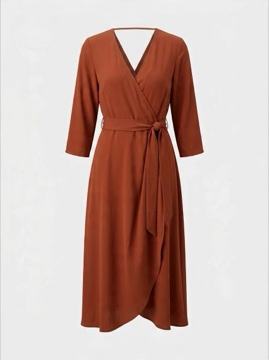
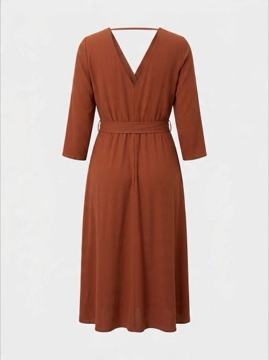

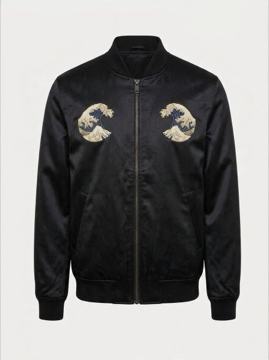
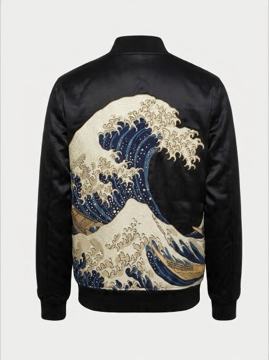

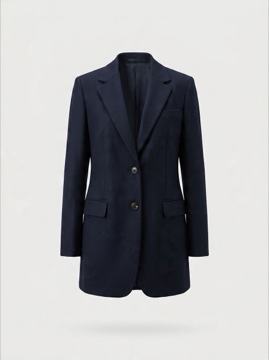
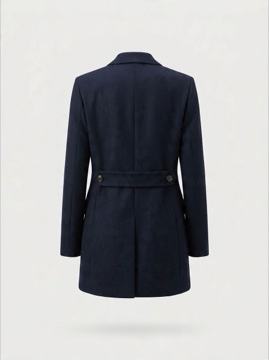
A photo-only try-on returns one still image of the front. Try LayerTry on a live store →
Where each app stands
Checked against both Shopify App Store listings in November 2026.
| LayerTry | VibeTry | |
|---|---|---|
| Try-on resultWhat the shopper gets | ✓Photo + Mirror check video + 360° video, for one piece or the whole look | Photo |
| Back and side of the garmentHow much of the piece they see | ✓Yes, the shopper turns 360° | Not shown: one still image |
| Movement and drapeHow the fabric falls | ✓Shown on video | Not shown in a still image |
| Product photos usedWhat the result is built from | ✓Front and back photos of the real piece | Product image |
| Pose per productStyled for the piece | ✓Mirror check pose made for each product | Not listed |
| Seeing a result againReplays | ✓Free, saved on the shopper's device | Not stated |
| Extra try-onsOver the monthly limit | ✓Pay per credit, up to your own cap | Not stated on its listing |
| Buy the whole lookOutfit tried on, every piece added to the cart | ✓Yes: Complete the look, added to the cart in one go | Not listed |
| Free planWhat it takes to start | 20 credits, once | 10 photo try-ons |
| Paid plansPer month | $49.99 · $99.99 · $199.99 | $17.99 · $39.99 · $99 |
Size advice vs seeing the whole piece
A size chart or size advisor answers which size to buy. It does not answer how the piece looks on the shopper, from the back, from the side, in motion.
LayerTry answers that: a 360° video and a Mirror check of the real piece on the shopper, from one selfie. It works next to your existing size chart.
What LayerTry is tuned for
360° video
Front, side and back of the real piece on the shopper. The part a single photo cannot show.
Mirror check
A short video of the shopper in a mirror, in a pose made for each product.
One selfie, every product
Shoppers add their photo once and reuse it across the whole store.
Demo Studio
On the paid plans: a try-on of the product on the store's own model, shown on the product page before the shopper adds a photo.
Free replays
Seeing a try-on again costs nothing: it stays saved on the shopper's device.
Complete the look
Shoppers build an outfit around the piece, try the whole look on and add every piece to the cart in one go.
From VibeTry to LayerTry, step by step
- Install LayerTry from the Shopify App Store. Try-on is available on every product; the free plan needs no card.
- Swap the app embeds in the theme editor: VibeTry off, LayerTry on (or add the LayerTry block to your product page). No code changes.
- Check the dashboard: every try-on, click and conversion, in real time.
Plans
Every plan includes try-on on every product, the photo, the Mirror check, the 360° video, the Complete the look builder and the analytics dashboard. The paid plans add the Demo Studio and more credits. Free: 20 credits, once. Paid: $49.99 · $99.99 · $199.99 per month, billed through Shopify, cancel anytime.
Questions, answered
What is the difference between LayerTry and VibeTry?
VibeTry returns a try-on photo and adds size recommendations. LayerTry returns the photo plus a Mirror check video and a 360° video the shopper can turn, so they see the back, the side and the drape.
Does LayerTry replace my size chart?
No. LayerTry shows the shopper wearing the product in video and works next to your existing size chart.
Which one is better for premium fashion brands?
LayerTry. For coats, knitwear, tailoring and dresses, how the piece looks from every angle and how it moves usually decides the purchase.
Can I compare LayerTry and VibeTry before deciding?
Yes. Duplicate your theme, turn on LayerTry's app embed in the preview and compare it with VibeTry on your live theme. The free plan makes the test free.
How do I switch from VibeTry to LayerTry?
Install LayerTry from the Shopify App Store, then in the theme editor turn VibeTry's app embed off and LayerTry's on, or add the LayerTry block to your product page. No theme code changes.
Do I need new product photos?
No. LayerTry uses the product photos already in your store. A front and a back photo of each piece give the best 360° result.
When a front photo is enough
A photo-only try-on can be enough for: sizing is the only question your shoppers ask; products where a front photo is enough.
More comparisons
Sources
- VibeTry on the Shopify App Store: plans, trial, languages, features
- VibeTry website
- LayerTry on the Shopify App Store
- LayerTry live demo store
Checked in November 2026. Plans and features change; if something here is out of date, write to [email protected] and we will correct it.
Try it on your own products
Install LayerTry free and compare it with your current setup on a theme preview.